Multi Zone Audio Player Features
Multi Room Audio Player is now Multi Zone Audio Player (MZAP 7) — rebuilt as a 64-bit application with full ASIO and Audinate Dante support. It was created together with professional sound engineers, in answer to the everyday needs of music control staff, DJs, and creative supervisors. It’s a complete audio solution for clubs, restaurants, hotels, multi-room apartments, smart homes, and large halls — and its simple, intuitive interface suits seasoned audio professionals and everyday music lovers alike, anyone who needs to fill many rooms with sound at once.
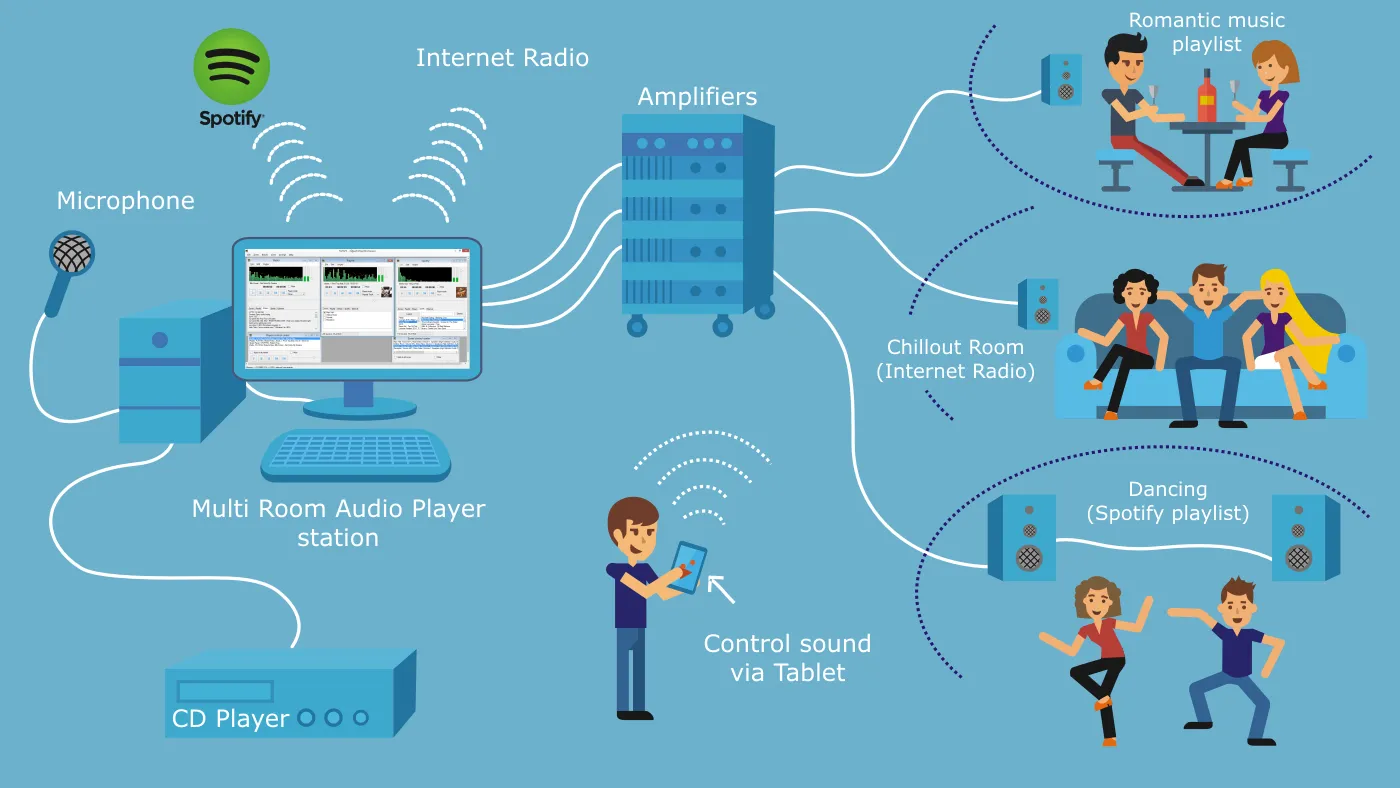
With Multi Room Audio Player, you can:
- Create and manage as many sound zones as you need from one audio player — define each zone around whichever device, channel or channel pair suits the room, with no fixed cap, limited only by your PC’s performance and available channels;
- Route any player to any combination of zones with the real-time matrix router — one player to many zones, many players into one, changed live with no interruption;
- Run each zone as mono on a single channel or as a true stereo pair;
- Use DirectSound, WASAPI, and ASIO audio devices, with the lowest latency on professional ASIO hardware;
- Get comprehensive Audinate Dante support via ASIO — select the Dante Virtual Soundcard driver to expose up to 64 Dante channels as independent zones, route them with Dante Controller, and bridge other apps with Dante Via;
- Receive audio from Apple devices — turn any zone into an AirPlay input, with its own name in the AirPlay picker and an optional password, and play straight into it from an iPhone, iPad or Mac;
- Control music over the local network;
- Control each audio room individually or all together;
- Assign each zone to a corresponding output audio device and channel(s);
- Play MP3, MP2, M4A, AAC, WMA, FLAC, OGG tracks and M3U playlists;
- Play Internet radio streams;
- Broadcast any zone as an internet radio station in MP3 or Opus — served straight from the PC, or pushed to an Icecast or Shoutcast server for a wider audience;
- Capture system audio with a Loopback player, or capture a specific running app — a browser, media player, or streaming app such as Spotify or YouTube — with the captured track title shown right on the player tile;
- Line-in and loopback support for external and system audio sources (TV, CD/DVD player or turntables);
- Create scheduled events with cron, interval, daily and weekly triggers — including a Prayer Time trigger for the five daily prayer times or sunrise, calculated from your venue’s location;
- Use the REST API or the built-in MCP (Model Context Protocol) server;
- Control zones, players and announcements from a Q-SYS system with the free Q-SYS control plugin — right on your Q-SYS touch panels, with live feedback;
- Make announcements with microphone management functionality;
- Duck the music automatically while someone speaks into the microphone, and keep unattended installs playing with stream-outage failover that returns to the live source on its own;
- Create text-to-speech jingles by simply typing — using the offline Windows voice or the Azure Speech and ElevenLabs cloud voices — played through the same ducking pipeline as file-based jingles;
- Use the built-in SQLite Music Library with folder watching and powerful full-text search;
- Create new playlists using the Playlist generator, including bulk playlist creation;
- Shape sound with a 10-band graphic equalizer and compressor on every player and zone;
- Use Instant Jingle hotkeys;
- All regular, built-in, semi-professional, and pro sound cards with WDM or ASIO drivers supported;
- Use the matrix view for centralized monitoring and control of all rooms;
- Use easy to use drag&drop multilingual interface.
Planned for the future:
- Native iPhone/Android remote control application;
- Audio normalization;
- Various audio settings like pitch, tempo, etc.;
- The “Solo” function allows monitoring music in rooms locally from a PC.
Please read Multi Room Audio Player Overview, take a look at this short video, or visit the screenshots page.