Multi Room Audio Player — now Multi Zone Audio Player (MZAP 7) — has a native control plugin for Q-SYS, the audio, video and control platform from QSC used in hotels, restaurants, offices and venues worldwide. Drop it into a Q-SYS design, point it at the PC running the player, and its zones, sources and announcements become ordinary Q-SYS controls — ready for touch panels, snapshots and scripts, alongside everything else in the system.
One Design, Both Systems
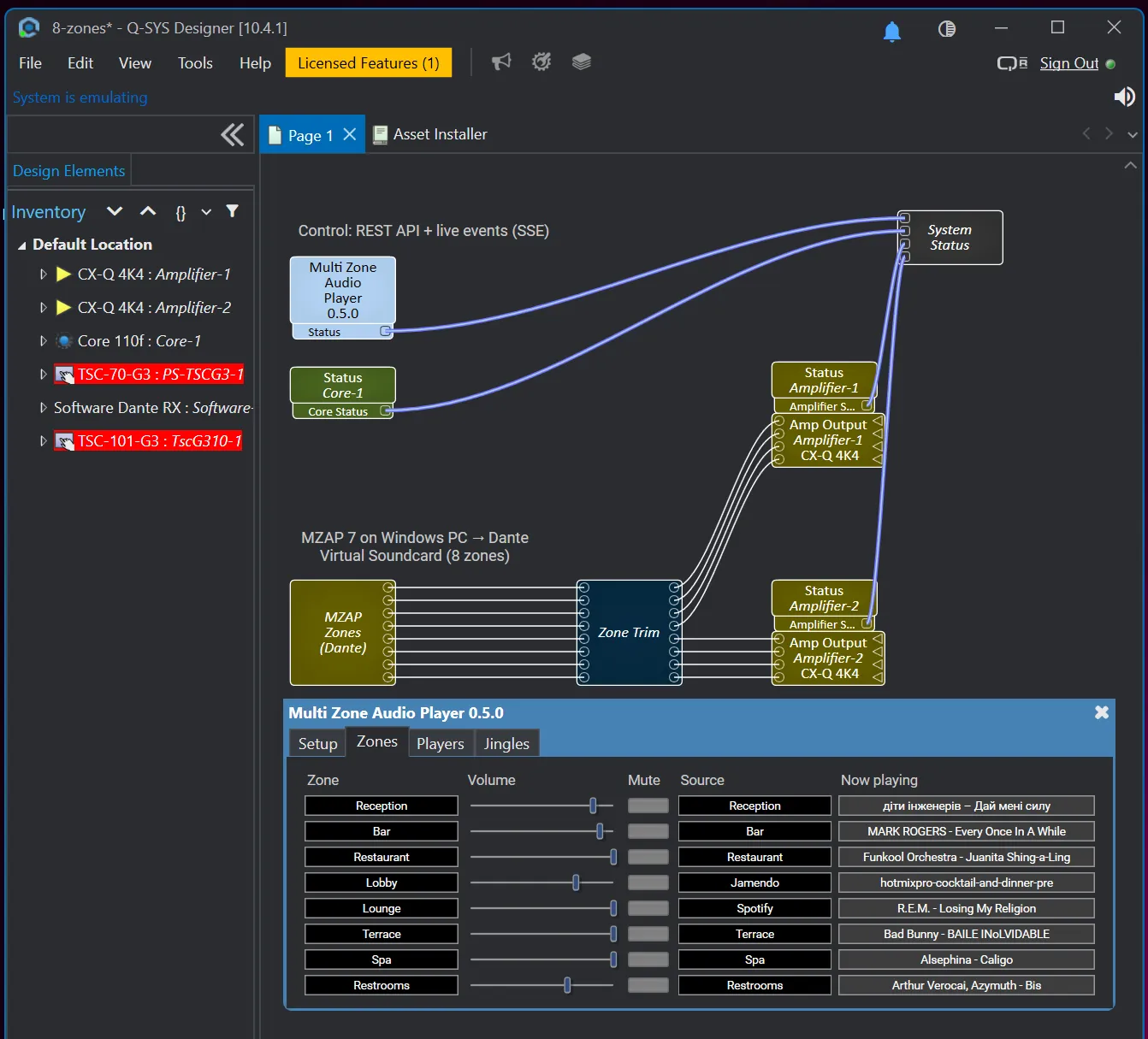
In a typical install, Multi Room Audio Player plays the music and Q-SYS runs the building. Until now, the two met only at the audio level: the player sent its zones over Dante, and staff opened a separate app to change what was playing. With the plugin, a single Q-SYS touch panel does both — the music level in the restaurant sits next to the lights and the paging, and the bar’s playlist is one tap away.
What You Can Control
Zones — volume in dB, mute, the source feeding each zone, and a Now playing line with artist and title.
Players — play, pause, stop, next and previous; pick a playlist and playback mode; volume and mute per player; current state and track.
Announcements — trigger any jingle you’ve prepared in the player, including text-to-speech jingles, on all zones or on the ones you choose. Put “Closing in 15 minutes” on a single button and hand the panel to staff.
Status — the plugin reports its connection state on a standard Q-SYS status pin, so the player shows up in the same system health overview as the Core and amplifiers.
The controls are exposed as pins, so they can go onto a UCI, into a snapshot (“Lunch”, “Evening”), or into your own Lua scripts.
Live, Not Polled
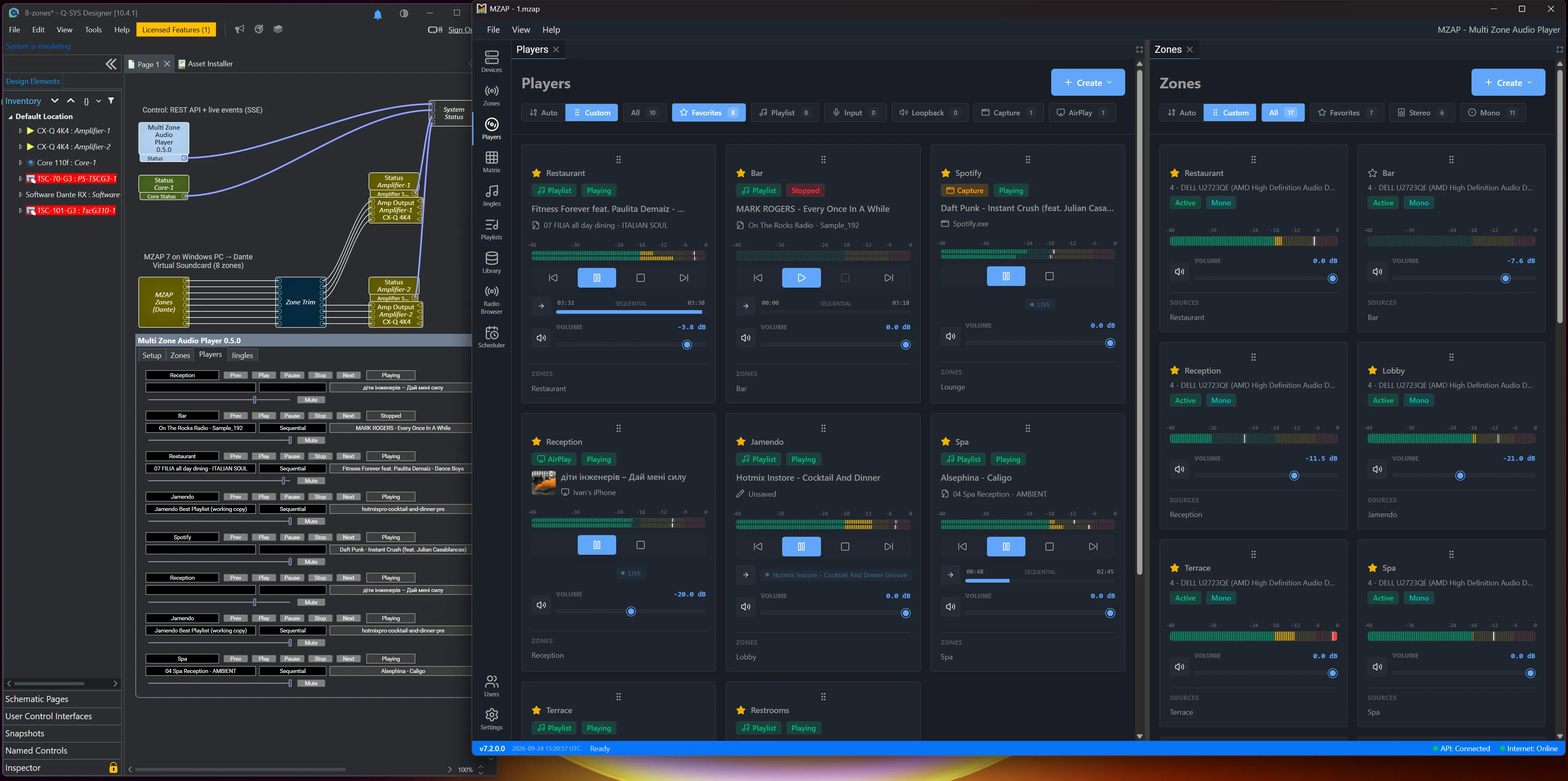
Change a volume in the Multi Room Audio Player interface and the fader in Q-SYS follows almost instantly. The plugin subscribes to the player’s live event stream and refreshes only when something actually changes, with a slow background poll as a safety net. If the link drops — a switch restarts, the PC reboots — it reconnects on its own.
Getting Started
- Download the plugin and double-click the file. Q-SYS Designer asks whether to install it — click Yes, and it appears under Schematic Elements → Plugins. Prefer to do it by hand? QSC describes both ways in Installing Custom Plugins to Q-SYS Designer.
- Drag Multi Zone Audio Player from the Plugins list onto your schematic and set how many zones and players you want to control.
- In the player, create an API key under Users. A key inherits its user’s role and assignments, so an Operator key sees only that user’s zones — handy when one Q-SYS system should control part of a venue.
- Enter the PC’s IP address, port and key on the plugin’s Setup page and switch Connect on.
Before You Start
- The plugin needs MZAP 7.2 or newer. We’ve tested it with Q-SYS Designer 10.4, including in emulation mode, so you can try it without a Core.
- The plugin is control only. Audio still reaches the Core the usual way: over Dante via Dante Virtual Soundcard — which on a Q-SYS Core needs a Software Dante licence for the channel count you use — or through the analogue inputs.
- This is a first release, distributed from our site. We’re working with Q-SYS to bring it to the Q-SYS Asset Manager. Until then, support for the plugin comes from us rather than from Q-SYS Technical Support — get in touch with any question.
Need more than the plugin does today? It’s written in plain Lua, so you can open it, see how it talks to the player’s API, and build on it for your own project. Or tell us what you need, and we’ll build it for you — extra controls, a custom panel layout, or a plugin for another control system.
Already running MZAP 7? Download the plugin and give it a try. Using a different control system — Crestron, Control4, RTI? Tell us which one should come next.
Q-SYS and QSC are trademarks of QSC, LLC. Multi Room Audio Player is an independent product and is not affiliated with or endorsed by QSC.